Blueprint & DAG
A Blueprint is the core abstraction of SeapoPym. It declares what a model computes — its variables, process steps, and how results feed back into state — without providing any concrete data.
What is a Blueprint?
A Blueprint is a YAML file with three sections:
- Declarations — All variables: state, parameters, forcings, and derived intermediates.
- Process — An ordered list of computation steps, forming a Directed Acyclic Graph (DAG).
- Tendencies — How derived fluxes contribute to state variable updates (Euler integration).
id: my-model
version: "1.0"

declarations:
  state:
    biomass:
      units: "g/m^2"
      dims: [Y, X]
  parameters:
    growth_rate:
      units: "1/s"
  forcings:
    temperature:
      units: "degC"
      dims: [T, Y, X]

process:
  - func: "mylib:compute_growth"
    inputs:
      biomass: state.biomass
      rate: parameters.growth_rate
      temp: forcings.temperature
    outputs:
      return: derived.growth_flux

tendencies:
  biomass:
    - source: derived.growth_flux
Separation of concerns
A Blueprint defines the topology (which functions, which connections). The Config provides concrete data (parameter values, forcing arrays, time range). One Blueprint can be run with many different Configs.
The Process DAG
Each process step declares:
- func — A registered function (format
namespace:function_name) - inputs — Maps function arguments to variable paths (e.g.,
state.biomass,forcings.temperature) - outputs — Maps function return values to derived variables
The engine executes steps in order. Each step reads from state, parameters, forcings, or previously computed derived variables, and writes to new derived variables.
Example 1: Growth and Temperature-Dependent Mortality
A simple ecosystem model: biomass grows at a constant rate and dies at a temperature-dependent rate.
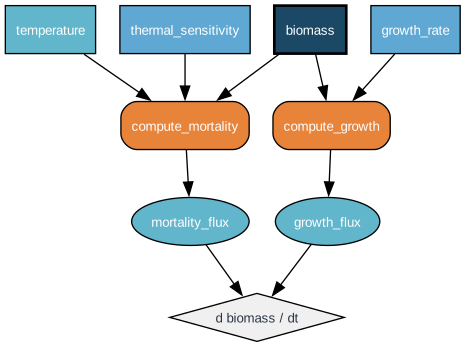
YAML for this model:
process:
  - func: "eco:compute_growth"
    inputs:
      biomass: state.biomass
      rate: parameters.growth_rate
    outputs:
      return: derived.growth_flux

  - func: "eco:compute_mortality"
    inputs:
      biomass: state.biomass
      temp: forcings.temperature
      gamma: parameters.thermal_sensitivity
    outputs:
      return: derived.mortality_flux

tendencies:
  biomass:
    - source: derived.growth_flux       # positive contribution
    - source: derived.mortality_flux    # negative contribution (function returns negative values)
Example 2: Predator-Prey
The classic Lotka-Volterra predator-prey model:
where \(\alpha\) is prey growth rate, \(\beta\) is predation rate, \(\delta\) is conversion efficiency, and \(\gamma\) is predator death rate.
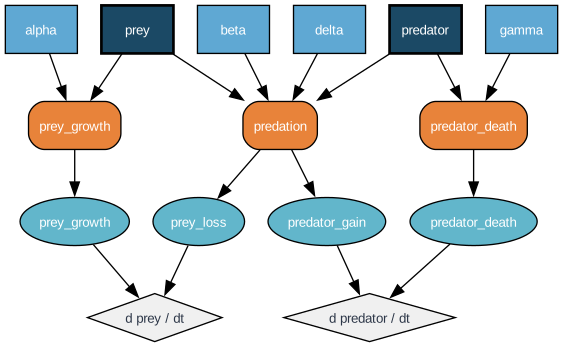
Key differences from Example 1:
- Two state variables (prey, predator) with separate tendency accumulators.
- Predation is a multi-output function: it produces both a loss for prey and a gain for predator.
- No forcings — all dynamics are purely parametric.
Example 3: SeapoPym LMTL (No Transport)
The full LMTL (Low and Mid Trophic Levels) model without spatial transport. This is the seapodym_lmtl_no_transport blueprint shipped with SeapoPym.
Two state variables track the ecosystem:
- production — Cohort-structured primary production (dims: F, C, Y, X). New production enters cohort 0 from NPP, ages through cohorts, and recruits to biomass.
- biomass — Aggregated biomass per functional group (dims: F, Y, X). Fed by recruitment, depleted by mortality.
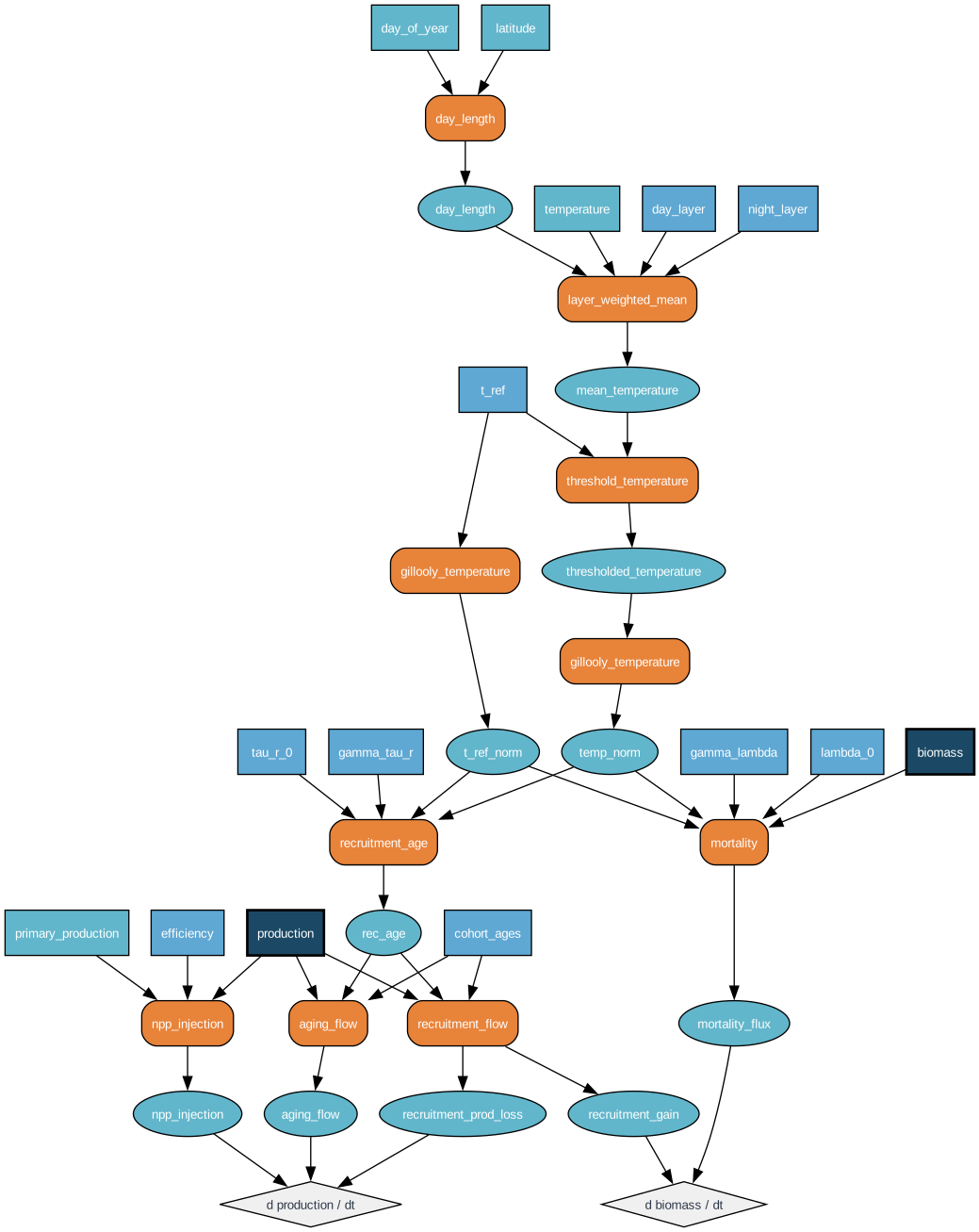
Key observations:
- Cohort structure — Production has a C (cohort) dimension. NPP enters at cohort 0, aging shifts production between cohorts, and recruitment transfers mature cohorts to biomass.
- DVM (Diel Vertical Migration) — The
layer_weighted_meanfunction combines day and night depth layers based onday_length, simulating organisms that migrate between depths. - Temperature chain — Raw temperature is depth-averaged (DVM), thresholded, then normalized via Gillooly's formula before being used in recruitment age and mortality calculations.
- Multi-output functions —
recruitment_flowreturns both a production loss and a biomass gain, connecting two state variables.
The @functional Decorator
Physics functions are registered using the @functional decorator, which attaches metadata for validation and automatic vectorization:
from seapopym.blueprint import functional

@functional(
    name="lmtl:mortality",
    units={
        "biomass": "g/m^2",
        "temp": "delta_degC",
        "lambda_0": "1/s",
        "gamma": "1/delta_degC",
        "t_ref": "delta_degC",
        "return": "g/m^2/s",
    },
)
def mortality(biomass, temp, lambda_0, gamma, t_ref):
    """Temperature-dependent natural mortality."""
    return -lambda_0 * jnp.exp(gamma * (temp - t_ref)) * biomass
The decorator stores:
| Metadata | Purpose |
|---|---|
name |
Unique identifier (namespace:function), referenced in YAML |
units |
Expected Pint units per argument + return value |
core_dims |
Dimensions the function operates on (not broadcast) |
out_dims |
Dimensions added by the function |
outputs |
Names for multi-output functions (tuple returns) |
Unit validation happens at compile time: the compiler verifies that all units in the process chain are consistent, catching errors like passing meters where seconds are expected.
Tendencies and Euler Integration
The tendencies section maps state variables to their flux sources:
tendencies:
  biomass:
    - source: derived.mortality_flux      # negative (loss)
    - source: derived.recruitment_gain    # positive (gain)
  production:
    - source: derived.npp_injection       # positive (source)
    - source: derived.aging_flow          # redistribution between cohorts
    - source: derived.recruitment_prod_loss  # negative (loss to biomass)
At each timestep, the engine applies explicit Euler integration:
The clamping to zero ensures physical non-negativity (e.g., biomass cannot go below zero).
Pre-defined Blueprints
SeapoPym ships with two reference blueprints:
| Blueprint | Description | State Variables | Process Steps |
|---|---|---|---|
LMTL_NO_TRANSPORT |
LMTL ecosystem without spatial movement | biomass, production | 10 |
LMTL |
Full LMTL with first-order upwind transport | biomass, production | 17 |
from seapopym.models import LMTL_NO_TRANSPORT, LMTL

# Or load by name
from seapopym.models import load_model
blueprint = load_model("seapodym_lmtl_no_transport")